Address Book - AIR SQLite example application
This is an example I originally wrote to use along with the Adobe AIR documentation, or perhaps as a supplementary “quick start” sample. In the end the scope of the example was too big for the documentation, so I cut it. However, I think it is useful for demonstrating a number of techniques — both beginner and intermediate — for working with the SQLite database engine that’s included with AIR.
Download the source (37kb .zip)
My standard copyright/license terms
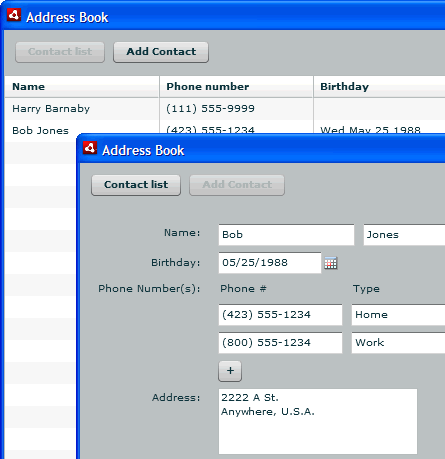
The app is a basic address book/contact list, with a list of contacts and a detail view where you can edit contacts or add new contacts:
Comments/trackbacks are closed for this post.


December 8th, 2008 at 3:17 am
naseer ahmad mughal is reported to have said:
How can i install and run this application on my local system…
Plz do assist me ASAP.
regards,
December 8th, 2008 at 12:16 pm
Paul Robertson is reported to have said:
@naseer:
Since this project is really intended as an example application (i.e. as source code you can look at) I didn’t bother providing a .air file for installing it.
If you want to test the application, you can compile it using the Flex SDK or Flex Builder and try it out. You can also use either one of those tools to create a .air file that you can install (assuming you have the AIR runtime installed on your machine).
June 30th, 2009 at 9:01 am
psu is reported to have said:
I tried running this example. But it won’t start when o press run. What could be the problem?
August 8th, 2009 at 2:46 am
robert is reported to have said:
I try to import your source as a flex project, but nothing will work, can you, please, tell me what is it that I’m doing wrong…it isn’t the first time that I import a flex project…
Thanx for your time….
September 18th, 2009 at 5:34 am
Anand K is reported to have said:
@robert,
First create new flex AIR project, then copy the com folder into the src folder of your project and copy the mxml file’s code into your project’s mxml file. Now, you will be able to run the application…
& its working great.
Hope this helps.
January 4th, 2010 at 11:31 pm
caixun is reported to have said:
i cann’t run it at local!
i create a new flex Air project,and then copy the src into project’s file. cannt run it .what’s going on ?
February 16th, 2010 at 2:07 am
Nuwan is reported to have said:
Thanks a lot!!!
September 24th, 2010 at 8:10 pm
kishi is reported to have said:
Thanks a lots. I learned more about SQLite . The database use synchronize,when I change open to openaSync,it doesn’t work,would you like to show me how to use asynchronize way and its different?
September 24th, 2010 at 8:17 pm
kishi is reported to have said:
oh..sorry, I want to know synchronize , I said opposited in my last comment
September 27th, 2010 at 9:47 am
Paul is reported to have said:
@kishi:
There are some important differences between working with databases in synchronous versus asynchronous mode. Some things “just work” when you switch between them but I’m not surprised that for a whole application it doesn’t work.
If you’d like to see a comparison between the two or see examples of using synchronous execution, you might want to take a look at these two examples/articles I wrote for the Adobe Developer Center. They are identical except that one uses synchronous execution and one uses asynch:
Working asynchronously with a local SQL database
Working synchronously with a local SQL database
However, I would also recommend that you give some thought to the question of why you want to use synchronous instead of asynchronous execution. For simple things synch code is easier to write and smaller. However, once you get to “real world” levels of complexity the benefits of using synch execution quickly disappear compared to the downsides, and you’ll likely end up rewriting your code using asynch anyway.
That’s one of the reasons I created my “SQLRunner” library — it removes a lot of the pain of the asynch approach (the many event handlers that are required for most actions) so you can execute your SQL in just a couple of lines of code and still get the benefits of using asynch execution, reusing objects, etc.
February 18th, 2011 at 3:51 pm
List Of Copyright Words | More More Pics is reported to have said:
[…] a list of contacts probertson.com This entry was posted in All. Bookmark the permalink. ← For B Bodies Only Bit Font […]
February 28th, 2011 at 5:06 am
Varun is reported to have said:
Thanks a lots.its really Good,can u tell me how to backup database.Actually I like to Add Backup option in this app. And How to use Mysql with AdobeAir app
February 28th, 2011 at 2:57 pm
Paul Robertson is reported to have said:
Hi Varun,
Since an AIR SQLite database is just a file on the filesystem, the easiest way to back it up is to just copy the file to somewhere else. You’ll want to do that when the database connection is closed to make sure the database isn’t in the middle of a transaction.
As for using MySQL with Adobe AIR, most often you’ll do that with a MySQL database that’s hosted on a server on the web somewhere. You’ll use some sort of server middleware like PHP, ColdFusion, etc. to go between your AIR app and the database. This is exactly the same as how you would use MySQL with any Flex or Flash app, so you should be able to find plenty of resources online. (I did a presentation on this several years ago. The concepts are the same, but a fair amount has changed since then in terms of actual implementation so you’ll probably want to look for a more recent tutorial.)
Some people have wanted to use MySQL running on a user’s local machine as a data source for an AIR app without needing a middle-tier. This was mostly in the early alpha days before the SQLite functionality was added, but the assql (http://code.google.com/p/assql/) project attempts to support that workflow.
March 8th, 2011 at 1:21 pm
Varun is reported to have said:
Hi
Paul Robertson,
Thanks a lot…Nice Presentation :):):)