Survey: Is a ChosenSecurity certificate trusted on your machine?

Posted June 24, 2009 11:32 am
Filed under: AIR, Privacy/security, Surveys

Please take the following “survey” to see if a ChosenSecurity code-signing certificate is trusted on your machine.

(If you’re curious, you can read the background details below.)

Here’s how you can help:

  1. Download the .air file for the test application (339 KB)
  2. Double-click the .air file to install it (you’ll need to have Adobe AIR installed already, of course).
  3. When the installer gets to the warning dialog, check to see if the certificate is trusted or not. If the certificate is trusted, the dialog will look like this (the circled areas are the specific things to check for):
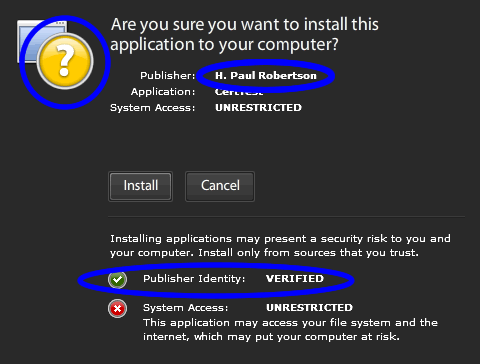
    You can cancel the installation once you’ve seen the dialog — it’s just a super-plain “hello world” application anyway.

  4. Leave a comment with your results! If the certificate is trusted (if it looks like the image) leave a “Yes” comment. If the certificate isn’t trusted, say “No” in your comment. In either case, you get bonus points if you add what kind of computer (manufacturer and model name) you tested, what operating system (including version number and language) you’re running, and where (country/city) you live.
  5. Repeat the test on other computers you may have access to (parents, friends, roommates, etc.). Spread the word and ask your developer friends to test it out also! I’d like to get a good cross-section of machines, not just developer machines in the United States running the latest OS X or Windows.

Once again, here’s the link to leave a comment with your results.

Background

I got a code-signing certificate from ChosenSecurity. Since they’re not a “big name” Certificate Authority like Verisign, I was worried that the certificate might not be trusted on as many machines. (If on a given machine a chain of trust can’t be established for a certificate you get the “unknown publisher” dialog when you’re installing AIR apps signed with that cert, regardless of whether the certificate is self-signed or not.)

However, since I was getting my code-signing certificate for free, I decided to give it a try and be the “guinea pig” for other developers who might be considering a ChosenSecurity certificate. (The advantages of the ChosenSecurity cert are that it costs less and you don’t have to have a backing company — you can get the certificate as an individual.)

Thanks very much for participating. Remember, this isn’t just for me — this is for all AIR developers who are wanting to get a code-signing certificate for less, but are concerned that the certificate might not be trusted on every machine where they’d like their apps to run.

You can leave a comment, or trackback from your own site.

10 Comments so far


  1. Peter Elst is reported to have said:

    Yes.

    Mac OS X 10.5.7 - 2.4 Ghz Intel Core 2 Duo
    2 GB 1067 MHz DDR3


  2. CoderX is reported to have said:

    No.


  3. Joern is reported to have said:

    Yes twice

    Mac OS X 10.5.6 as well as Windows XP

    But i need to install the Adobe AIR (http://get.adobe.com/air/) first.

    I can’t believe that CoderX reporst a ‘No’. It isn’t possible because the Adobe AIR certificate is signed by a root certificate which in stored inside the Adobe AIR app. The signed app is trusted ever.


  4. Paul Robertson is reported to have said:

    @Joern:

    Thanks for trying this out (on two computers even!)

    It’s certainly possible for CoderX or anyone else to have a “No” response. (Otherwise I wouldn’t have asked the question =) Admittedly it seems less likely since the cert was trusted for all the other responses I’ve gotten so far (including some that aren’t in the comments here). However, I haven’t heard from anyone using a Linux machine (as far as I know) so that may be what’s different, or it might be for some other reason.

    As you say, the app was signed by my cert, which was signed by a root cert from the certificate authority. My real question that I’m hoping to answer is whether that CA’s root cert is trusted on a large number of machines.

    It’s possible that the root cert isn’t trusted on a machine, either because it isn’t in the set of certificates that are installed with the operating system, or because the root cert was explicitly designated as not trusted on that computer.

    For lots more details about how AIR uses code-signing certificates, see the article “Code Signing in Adobe AIR” by Oliver Goldman (AIR lead developer)


  5. Matt is reported to have said:

    Yes, it worked on my Vista-64 machine.

    Thanks for doing this. I’m purchasing a cert myself right now.


  6. Joern is reported to have said:

    I also has a test with Adobe AIR and Linux
    I have used Adobe AIR togehter with Ubuntu.

    1. Open Terminal
    2. Download installationfile
    3. Terminal: change into the folder you have stored the downlaod-file.
    4. Use Command:
    chmod +x adobeair_file-name.bin
    5. additional use the Command:
    sudo ./adobeair_file-name.bin
    6. The program will be installed.

    Adobe Air needs the two packages:
    gnome-keyring and Kwallet

    Inside the Ubuntu Installation these two packages are still installed. The installation are ready to use.

    The AIR app shows “Verified”, so you got a YES with Ubuntu.


  7. al is reported to have said:

    Hi

    I cannot download the AIR, it just downloads as a .zip file and then inside it has a swf file?

    Any reason for this?

    Thanks, would love to test this thing out


  8. Paul Robertson is reported to have said:

    Hi al,
    Unfortunately the server that hosts my web site is not configured to recognize the .air extension. As a result, it sometimes serves .air files as .zip files (since that’s really what the .air file format is — a .zip file with a certain internal file structure.

    If the file downloads with a .zip extension, just rename it to .air and it will work fine.


  9. Phil is reported to have said:

    Paul,
    Interesting. I have 2 Vista 32b machines and it was recognized on one but NOT on the other…
    I have also an XP and it did work.

    Now, if a customer runs into the second case, does he have a way to get this root cert to get trusted?

    Which of the 4 CA authorities that code-sign Air apps are trusted on the most computers?


  10. Al is reported to have said:

    Hi Paul

    Tested on our new PB iXtreme Win 7, and it works perfectly without any trust problems.

    Shows up exactly the same as in the image at the top of the page.

    Thanks

Add your comment


Comment notes

Please keep comments on topic. Comments that are inappropriate or offensive will be edited or removed.

Paragraphs and line breaks are automatically converted to HTML, and quotation marks are converted to “smart” quotes.

The following XHTML tags can be used: <a href="" title=""> <abbr title=""> <acronym title=""> <b> <blockquote cite=""> <cite> <code> <del datetime=""> <em> <i> <q cite=""> <strike> <strong> . All others will be removed.

Articles by Type

Articles by Topic

Random Reading

Currently...

Subscribe